VNM DIRECT DRIVE USER MANUAL
REVISION 1.0
Please read the manual carefully before installing or operating the wheelbases.
1. VNM Direct Drive Wheelbase specifications
VNM Direct Drive Wheelbase Family (abbreviated as: “wheelbase”) has 4 types which have different specifications as bellow
| Premier | Elite | Supreme | Xtreme | |
|---|---|---|---|---|
SKU |
VNM-DD01PRE |
VNM-DD01ELI |
VNM-DD01SUP |
VNM-DD01XTR |
Motor |
5 polepairs smooth motor |
5 polepairs smooth motor |
5 polepairs smooth motor |
5 polepairs smooth motor |
Encoder |
23-bit encoder |
23-bit encoder |
23-bit encoder |
23-bit encoder |
Maximum torque |
13Nm |
18Nm |
25Nm |
32Nm |
VNM QR Base Side |
Included |
Included |
Included |
Included |
EMC Stop Button |
Regular (Superior optional) |
Regular (Superior optional) |
Superior |
Superior |
Power supply |
300 W |
360 W |
480w |
480w |
Wheelbase Dimensions (without QR base side) |
130x130x228mm |
130x130x247mm |
130x130x267mm |
130x130x271 mm |
Wheelbase weight (kg) |
11.6 |
13.3 |
15.7 |
16 |
Packing Box(cm) |
47x35x24 |
47x35x24 |
49x35x24 |
49x35x24 |
Box includes |
|
|||
2. Wheelbase Mounting Pattern
2.1. Front mounting pattern
All wheelbase of VNM has same front mounting pattern as following:
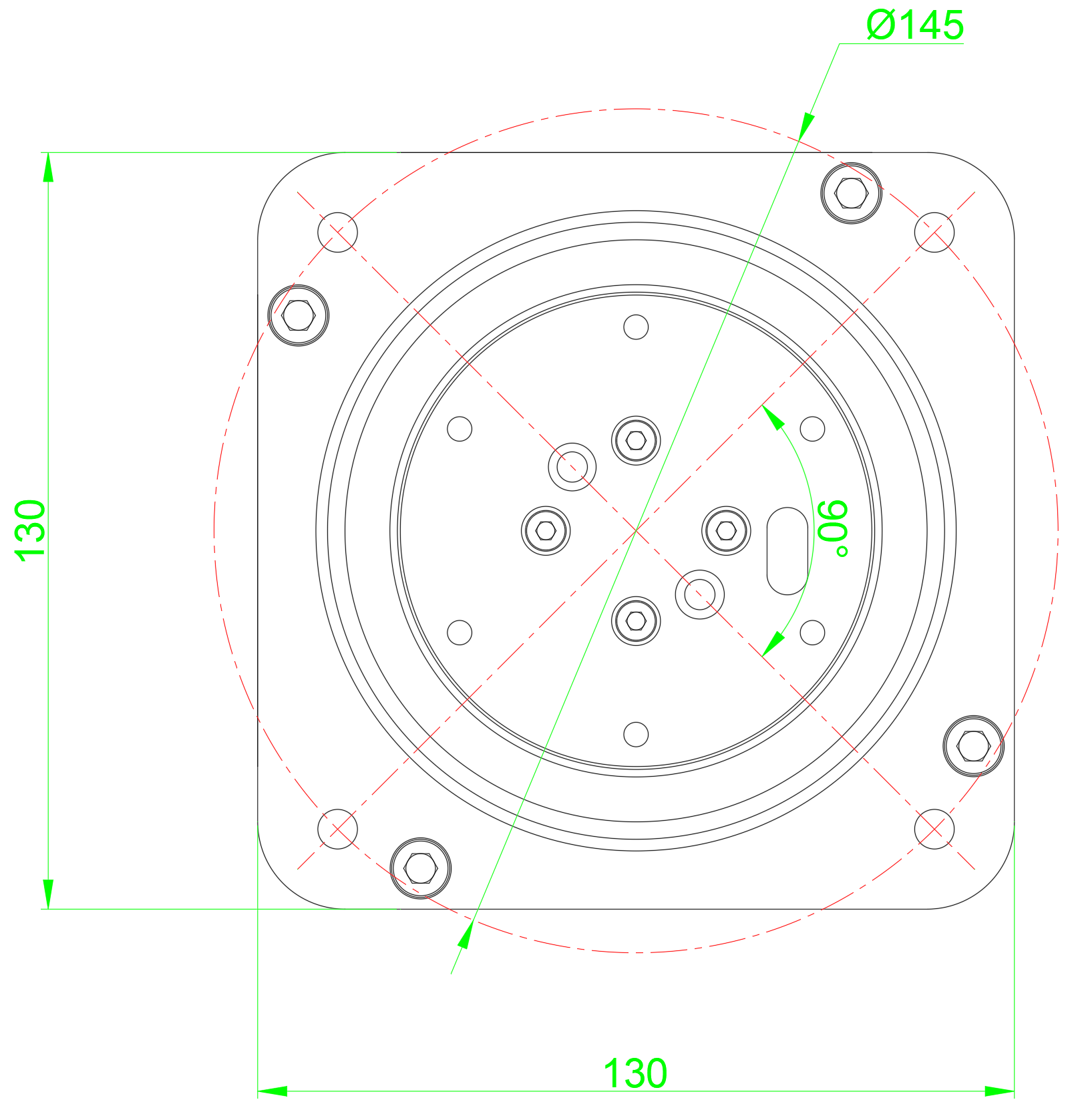
Figure 1. VNM Wheelbase Front dimensions
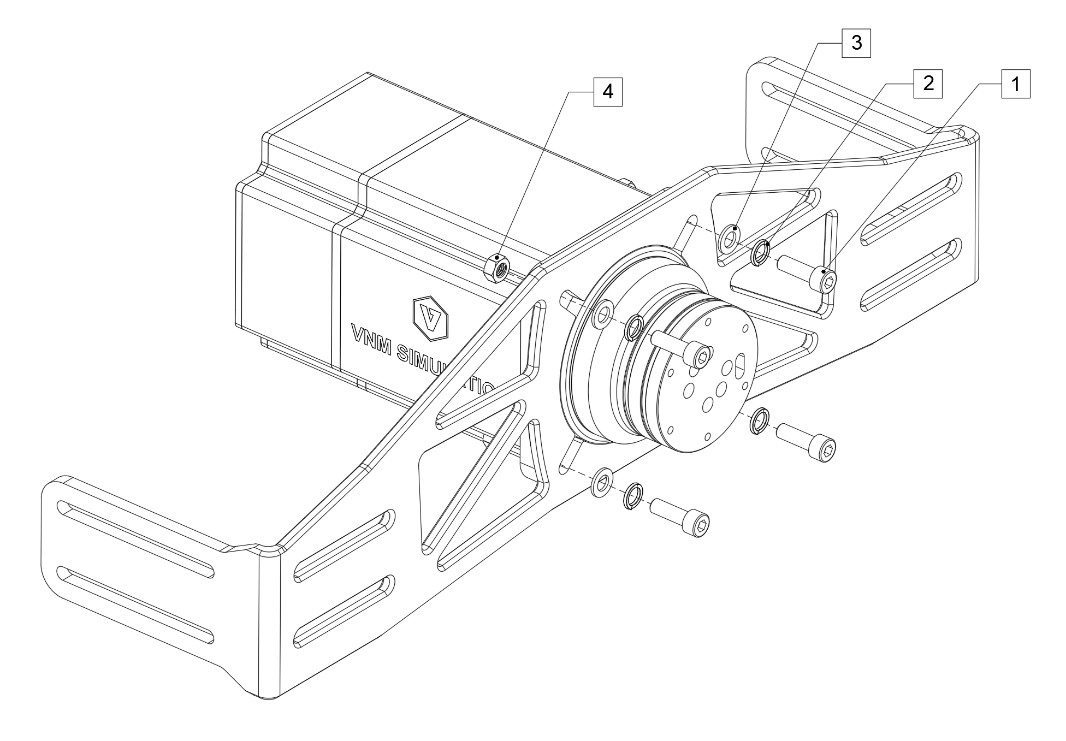
Figure 2. Mounting VNM Wheelbase on a simulator rig front mount bracket.
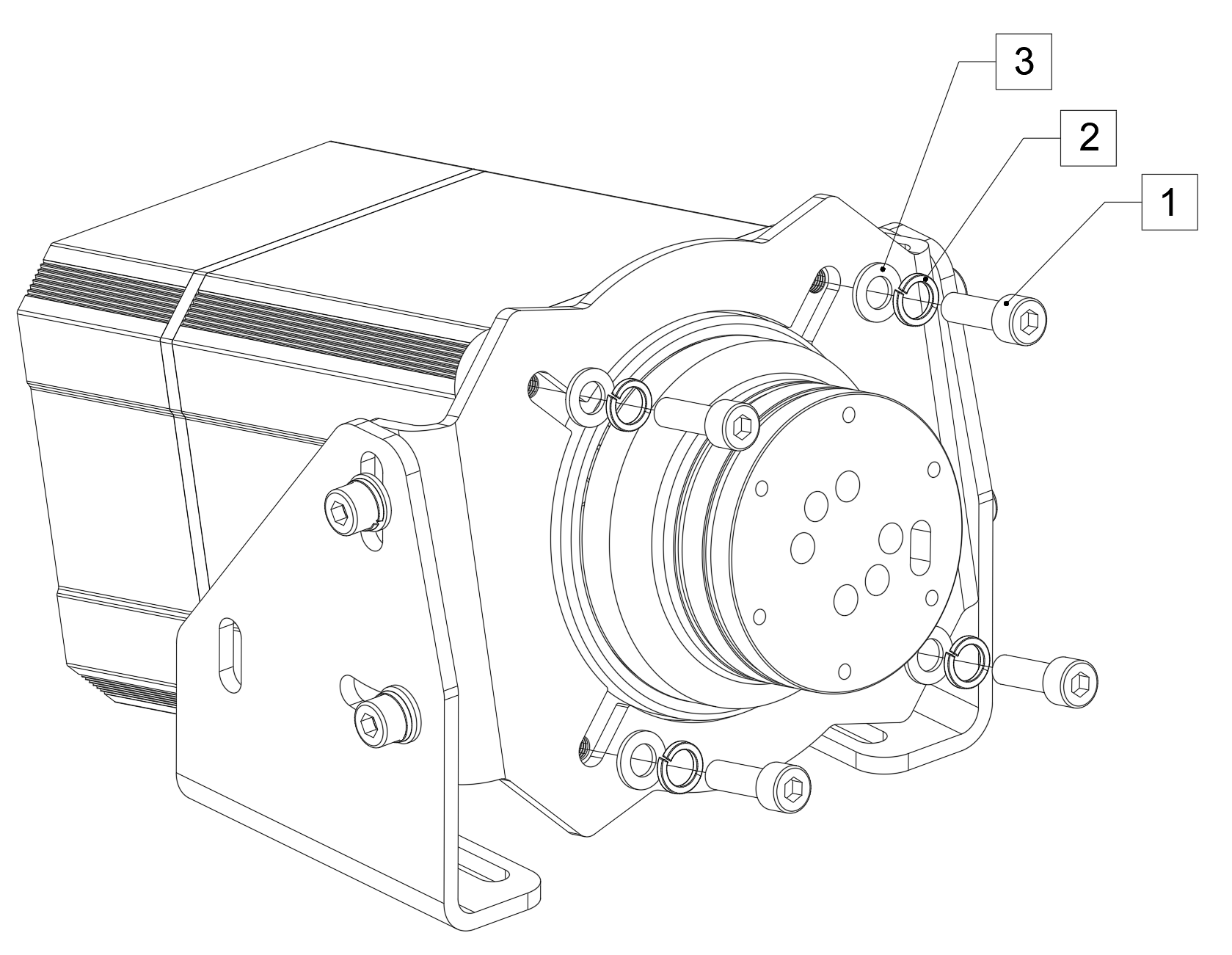
Figure 3. Mounting VNM Wheelbase using a mounting bracket
| Wheelbase Xtreme | is mounted with 4xM8 bolts length 30mm with 1,25mm thread pitch (1); 4xM8 spring washers (2); 4xM8 flat washers (3) and 4xM8 nuts (4) in Figure 2 |
|---|---|
Wheelbase Premier, Elite, Supreme |
are mounted with 4xM8 bolts length 25mm with 1,25mm thread pitch (1); 4xM8 spring washers (2) and 4 xM8 flat washers (3) in Figure 3. |
2.2. Side mounting pattern
Only The wheelbase Premier, Elite, Supreme have side mounting pattern
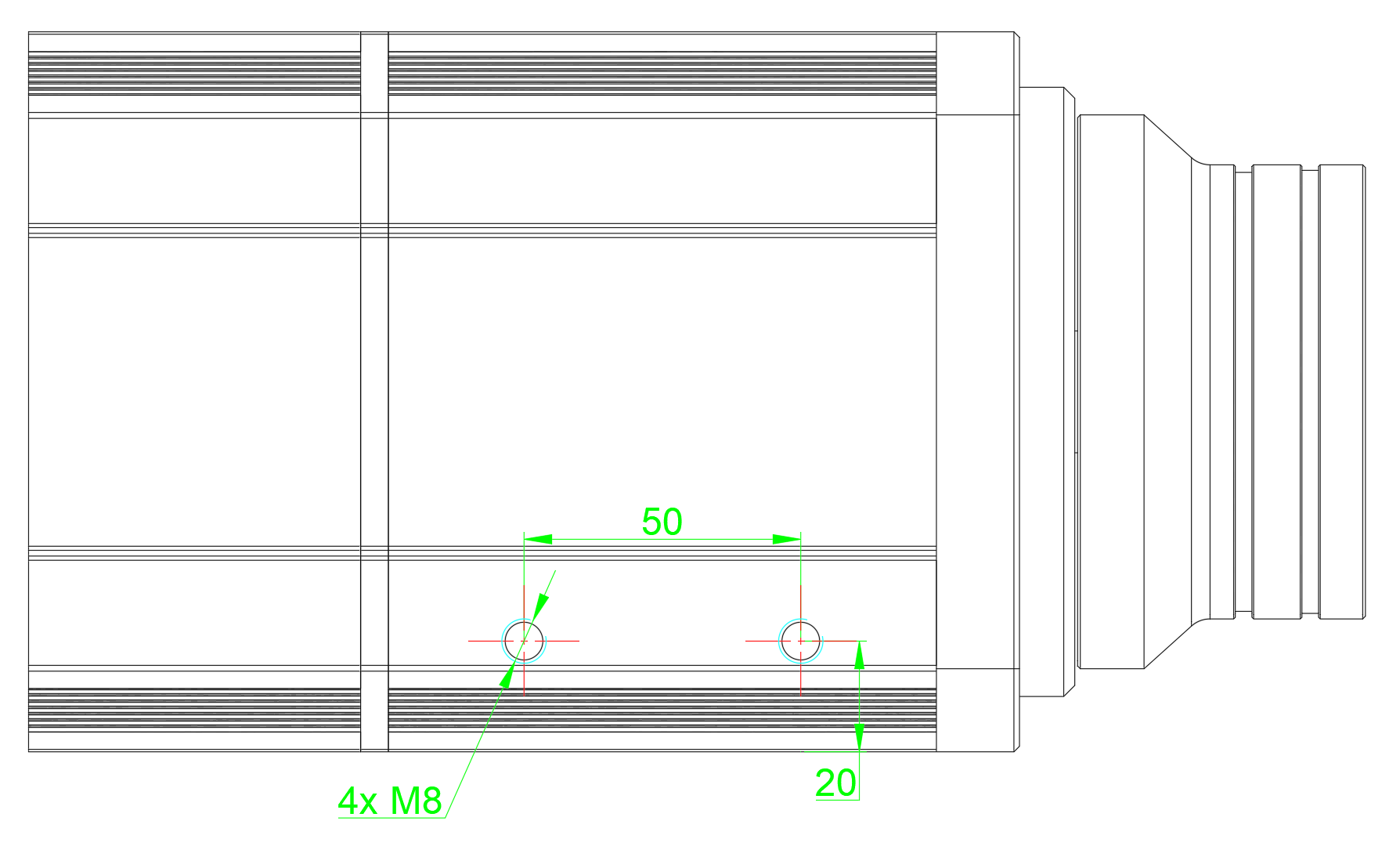
Figure 4. VNM Wheelbase Premier, Elite, Supreme side mounting pattern
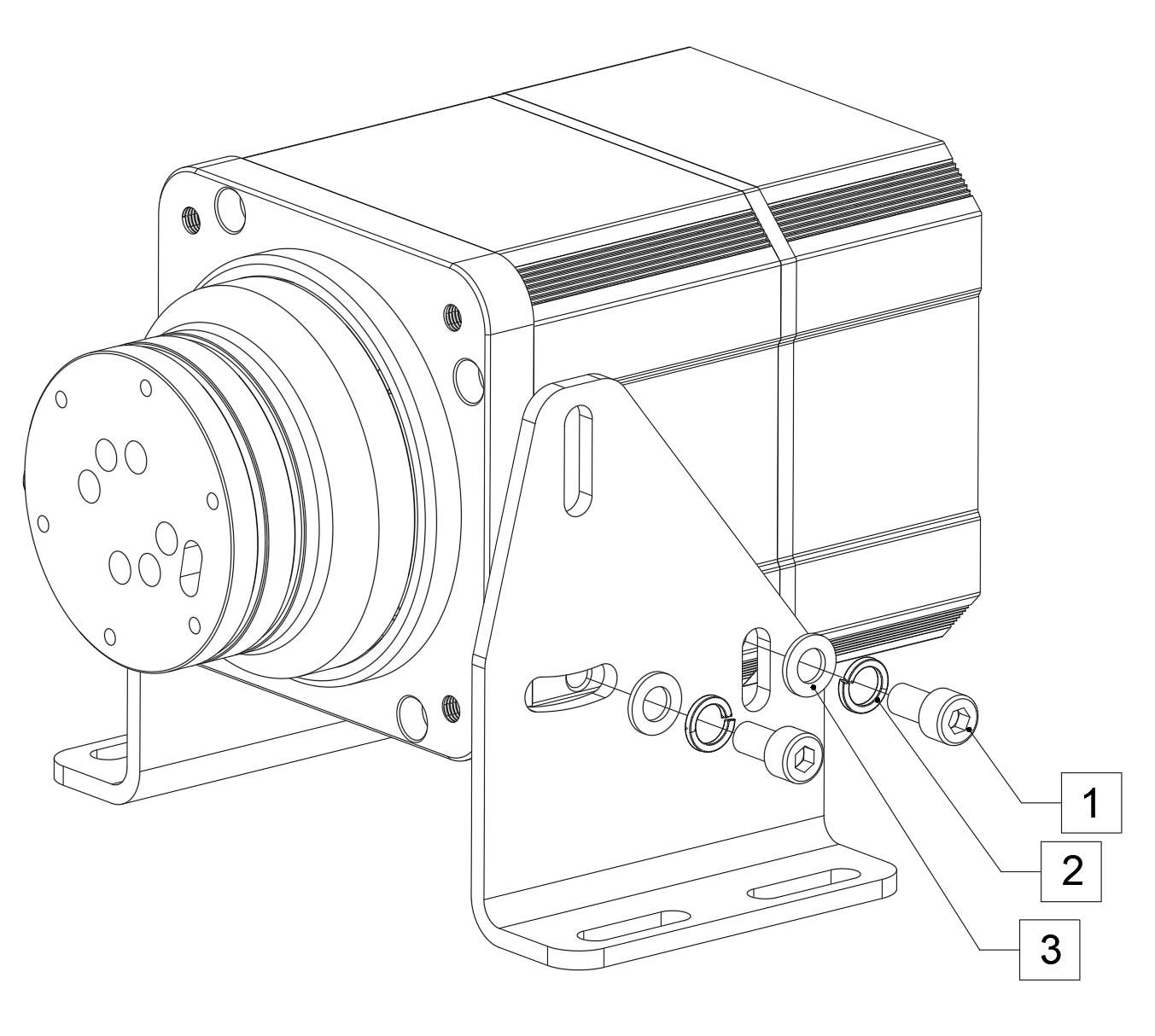
Figure 5. Mount VNM Wheelbase Premier, Elite, Supreme with side mount bracket.
Wheelbase Premier, Elite. Supreme are mounted with 4xM8 bolts length 20mm with 1,25mm thread pitch (1);4xM8 spring washers (2) and 4xM8 flat washers (3).
2.3. Bottom mounting pattern
Only The wheelbase Premier, Elite, Supreme have bottom mounting pattern
2.3.1. The Wheelbase Premier
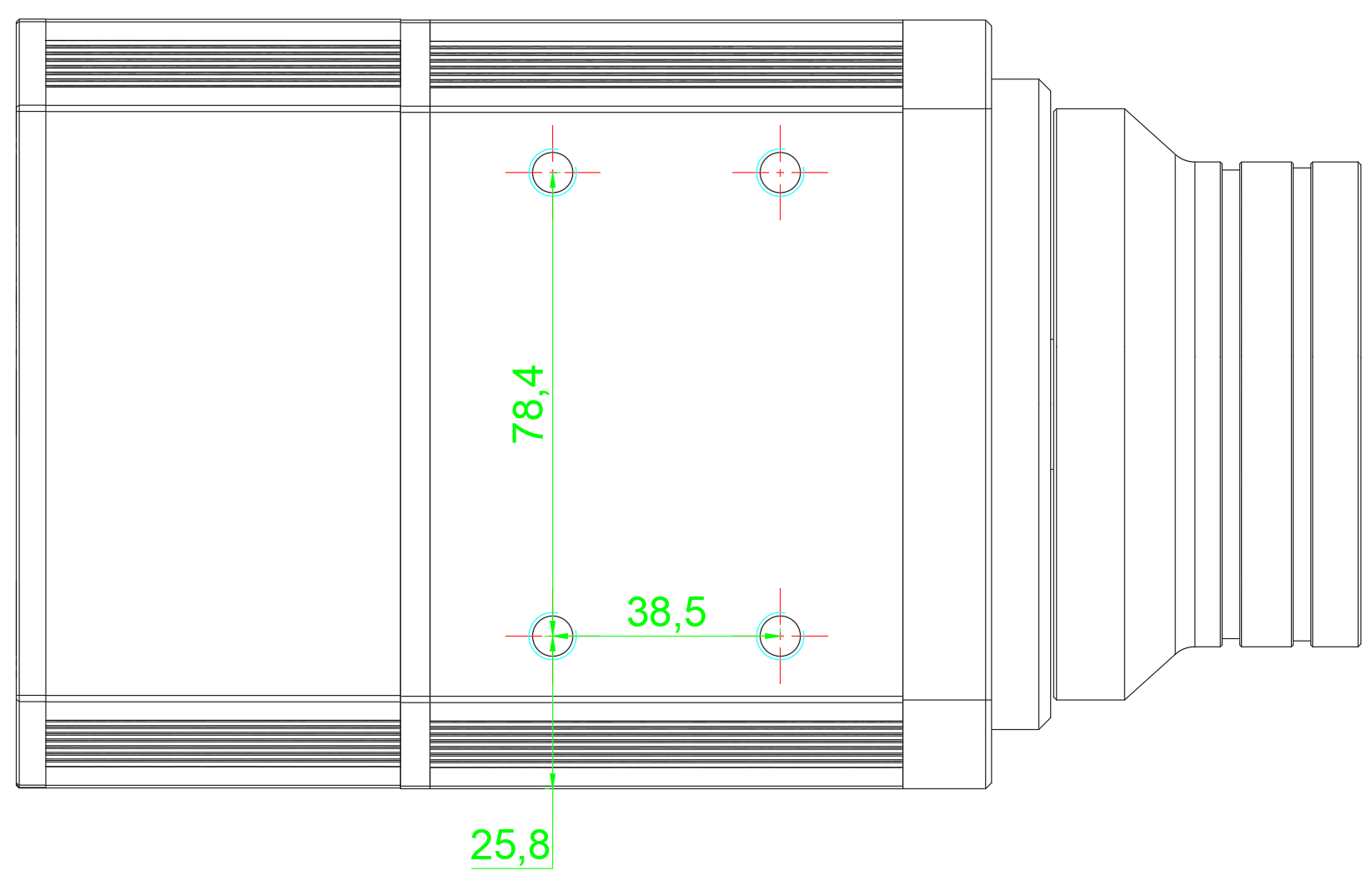
Figure 6. VNM Wheelbase Premier mounting pattern.
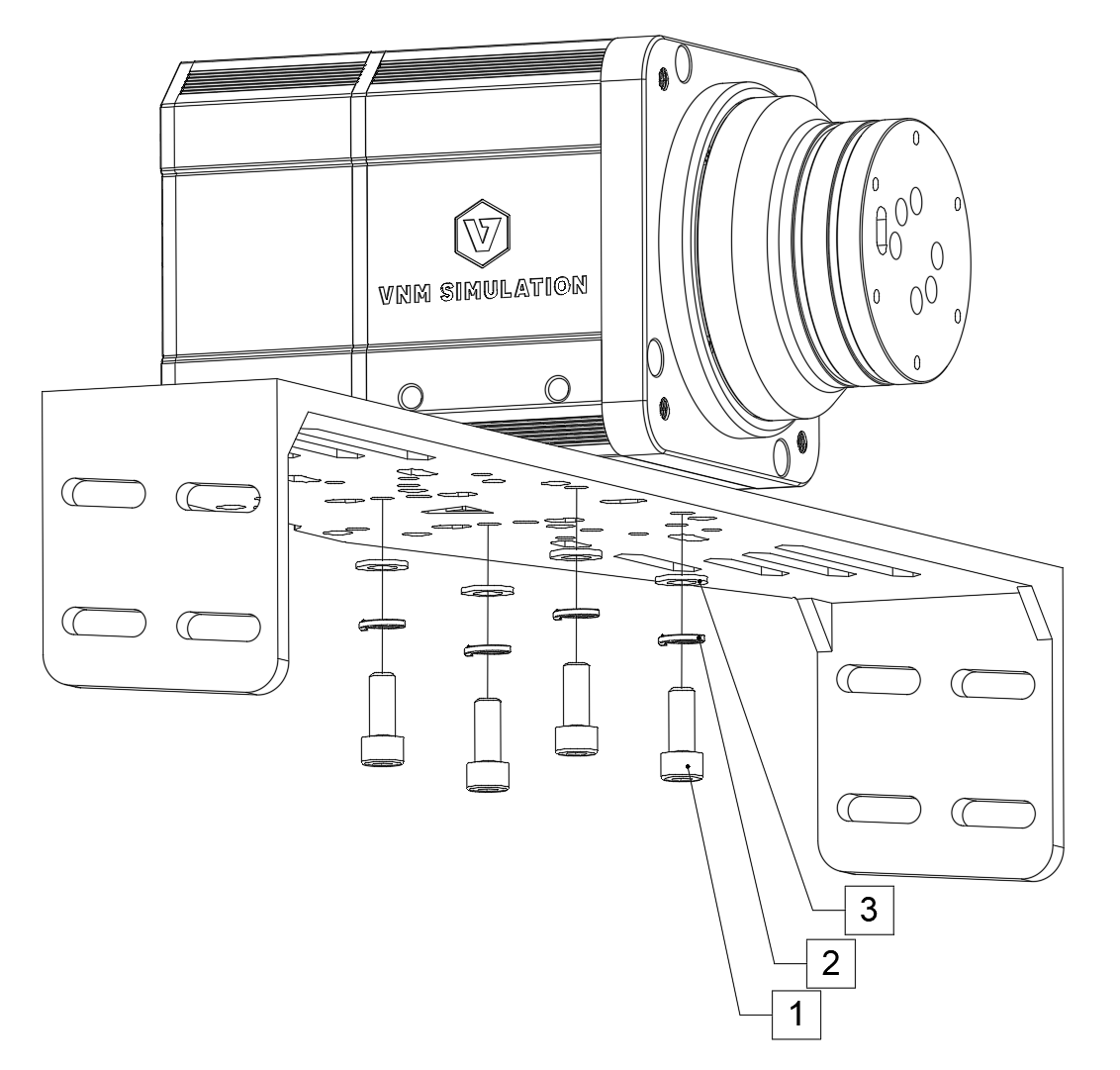
Figure 7. Mounting VNM Wheelbase Premier on bottom mounting bracket.
Wheelbase Premier is mounted with 4 x M8 bolts length 20mm with 1,25mm thread pitch (1); 4 x M8 spring washers (2) and 4 x M8 flat washers (3).
2.3.2. The Wheelbase Elite
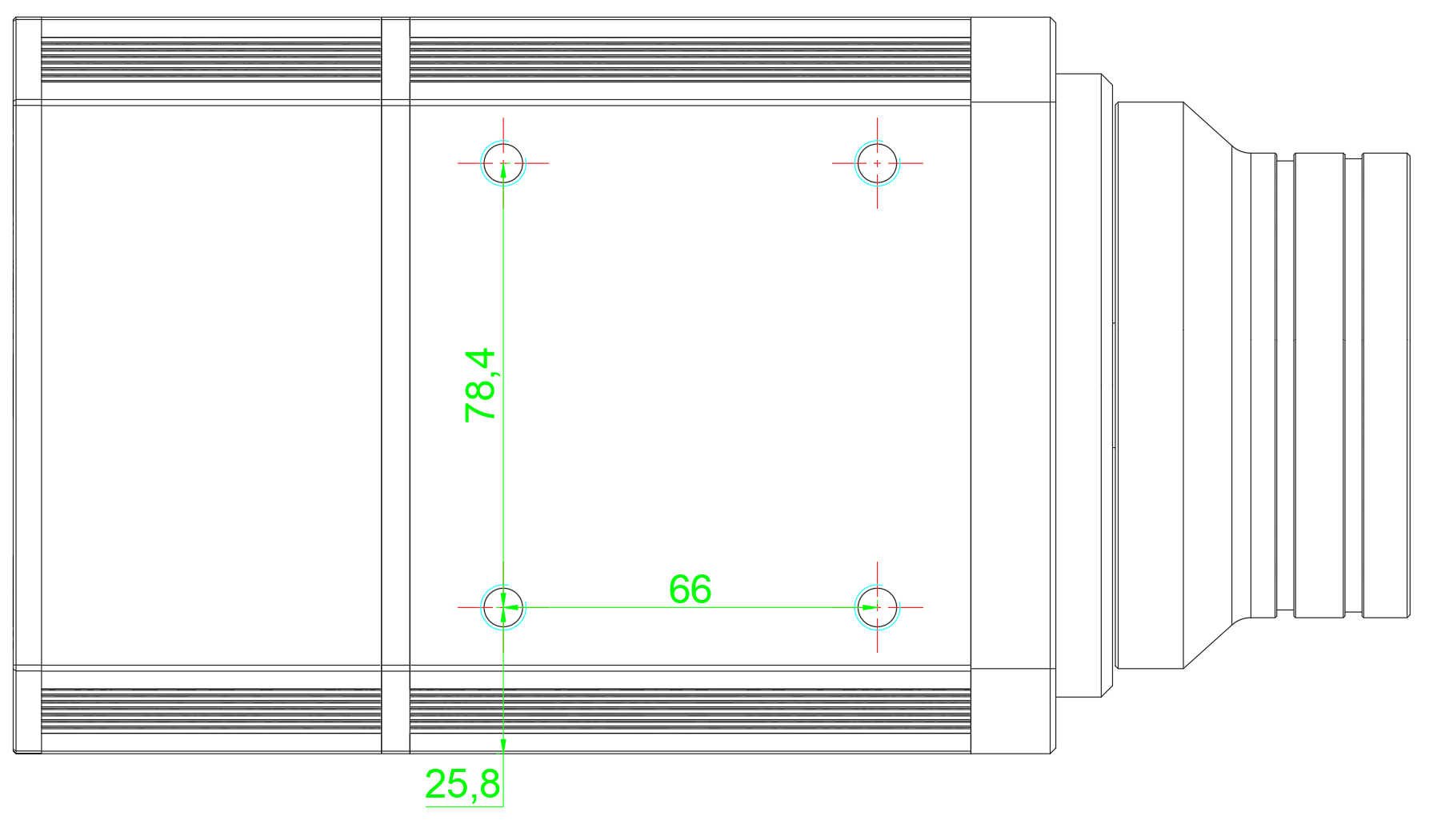
Figure 8. VNM Wheelbase Elite bottom mounting pattern.
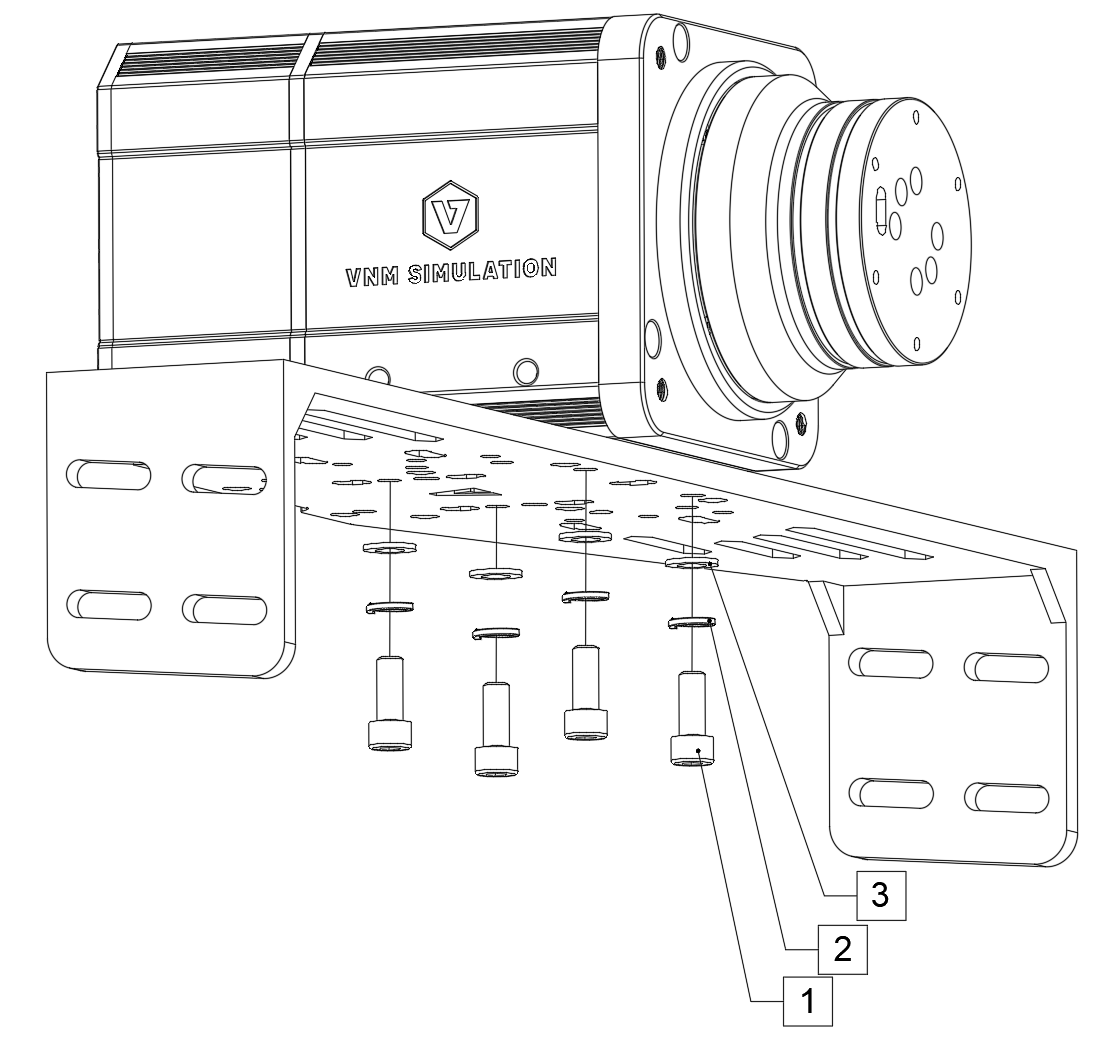
Figure 9. Mounting VNM Wheelbase Elite on bottom mounting bracket.
Wheelbase Elite is mounted with 4xM8 bolts length 20mm with 1,25mm thread pitch (1); 4xM8 spring washers (2) and 4xM8 flat washers (3).
2.3.3. The Wheelbase Supreme
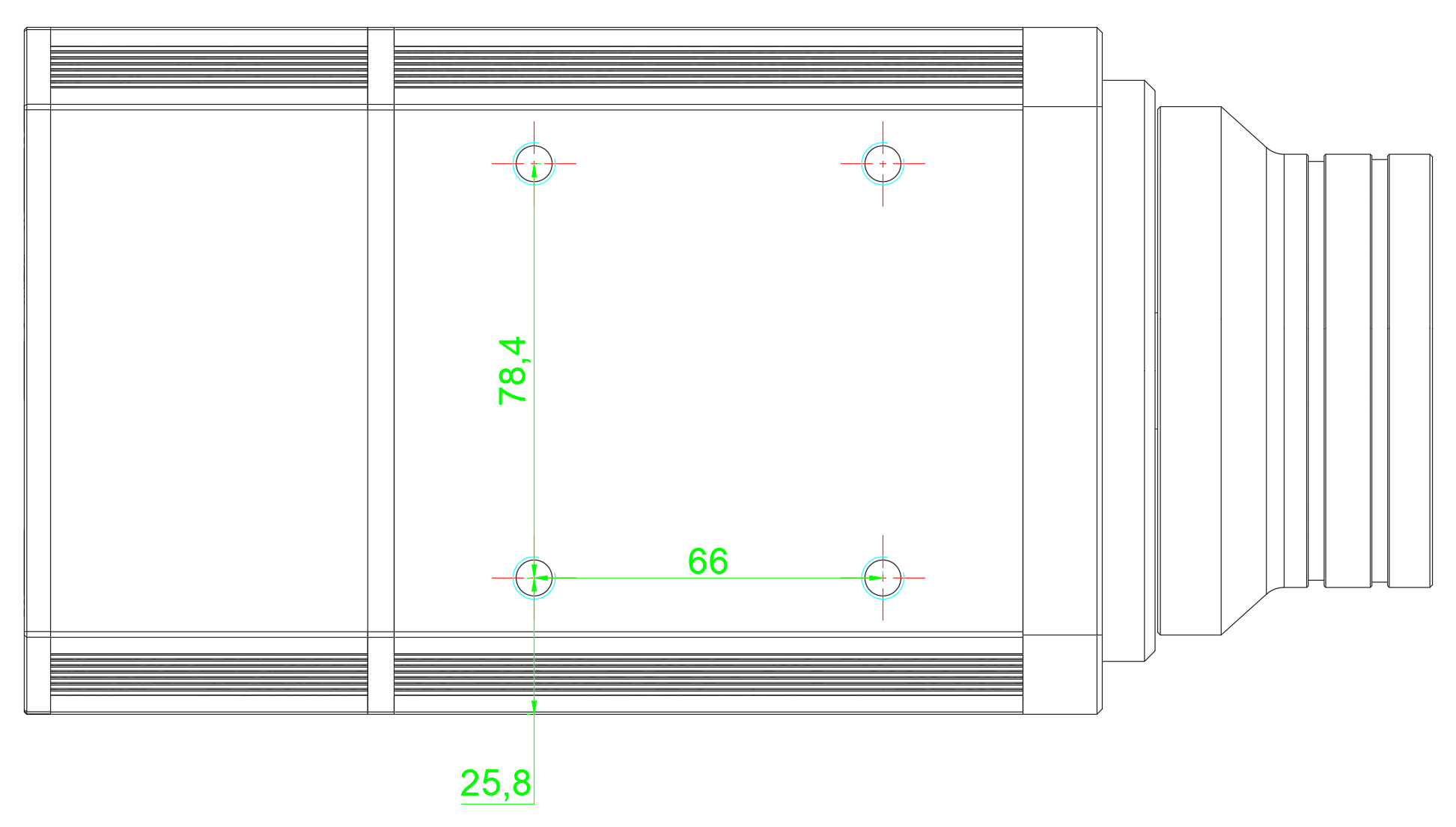
Figure 10. VNM Wheelbase Supreme bottom dimensions
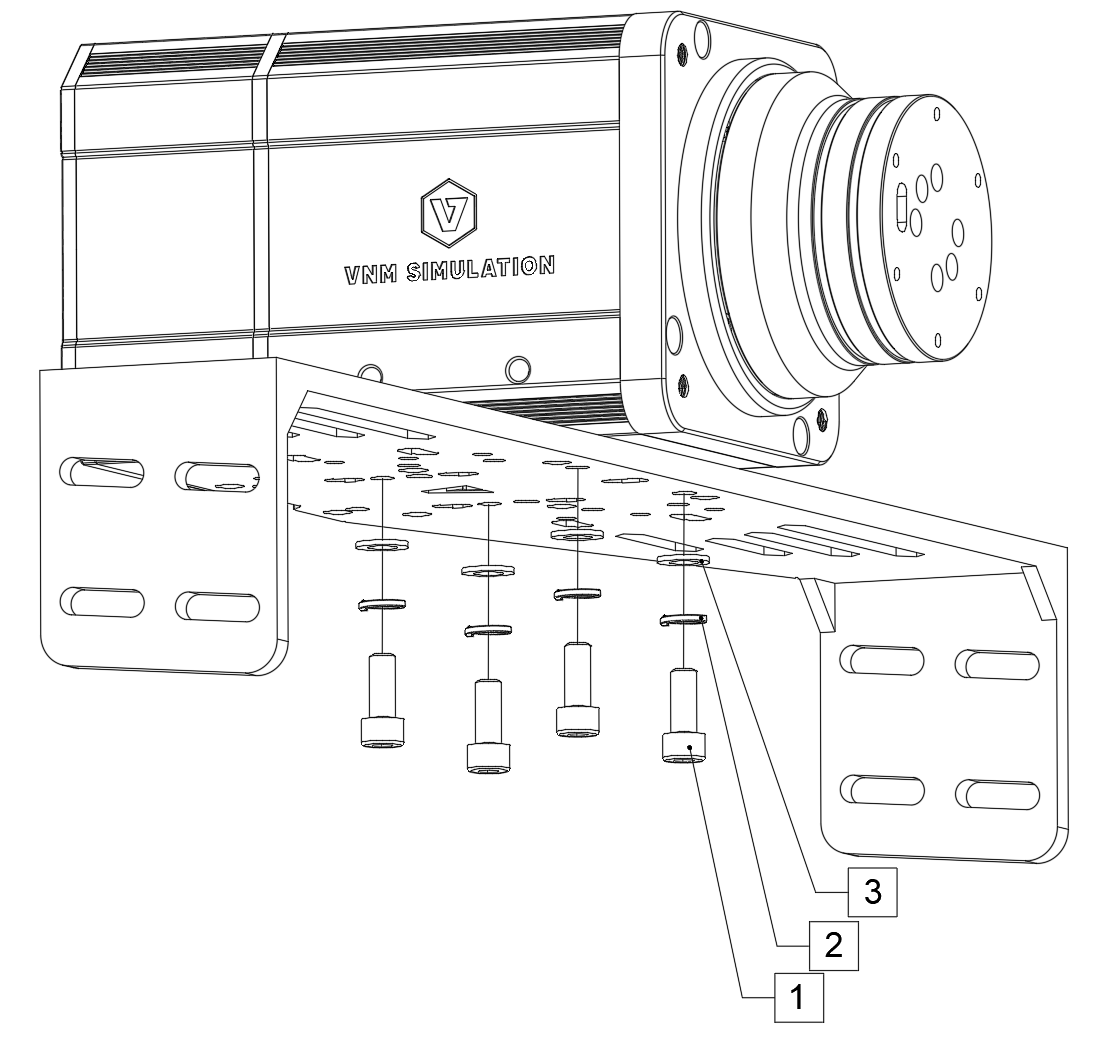
Figure 11. Mounting VNM Wheelbase Supreme on bottom mounting bracket.
Wheelbase Supreme is mounted with 4xM8 bolts length 20mm with 1,25mm thread pitch (1);4xM8 spring washers (2) and 4xM8 flat washers (3).
3. Connection
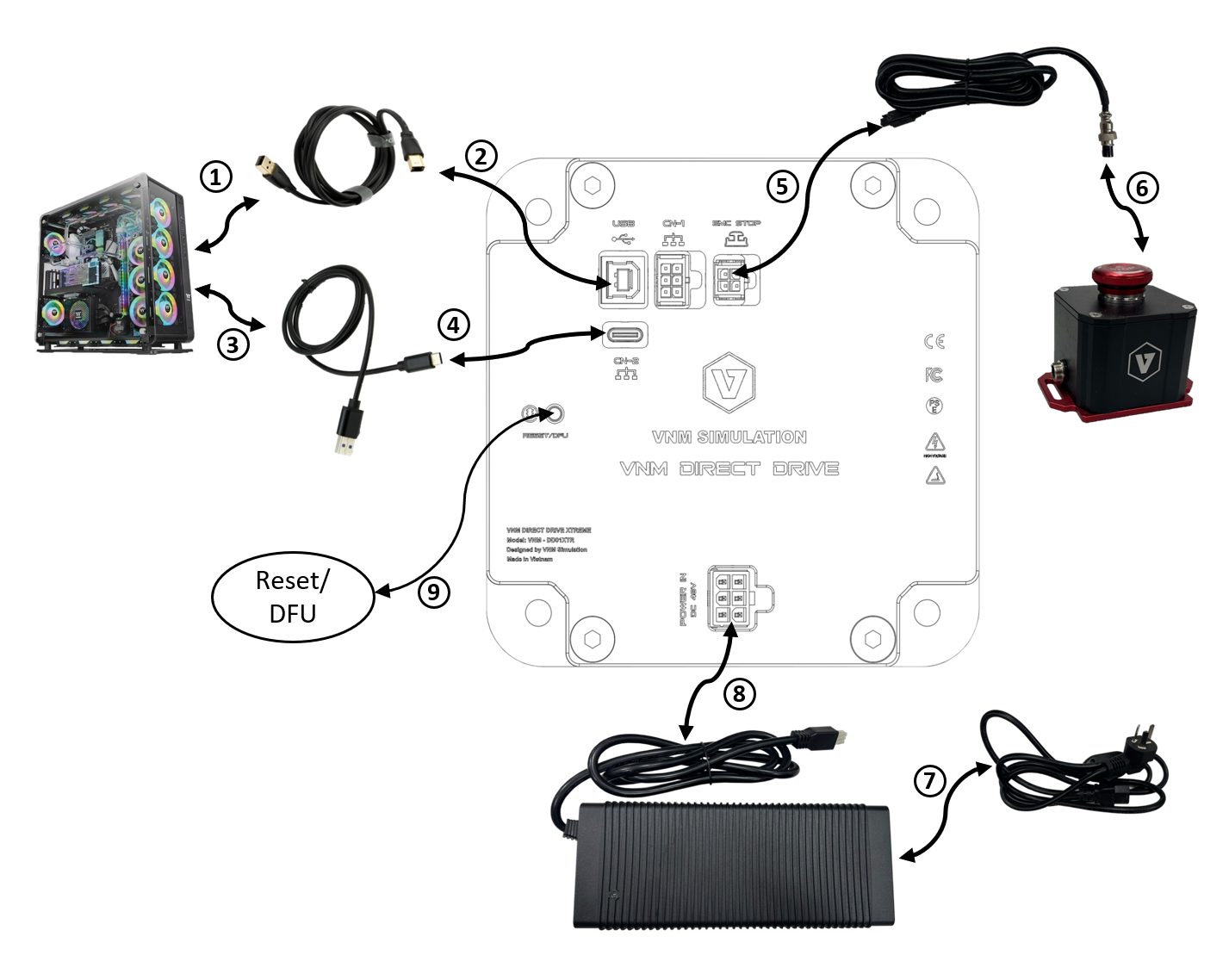
Figure 12. Connection ports of VNM Wheelbase.
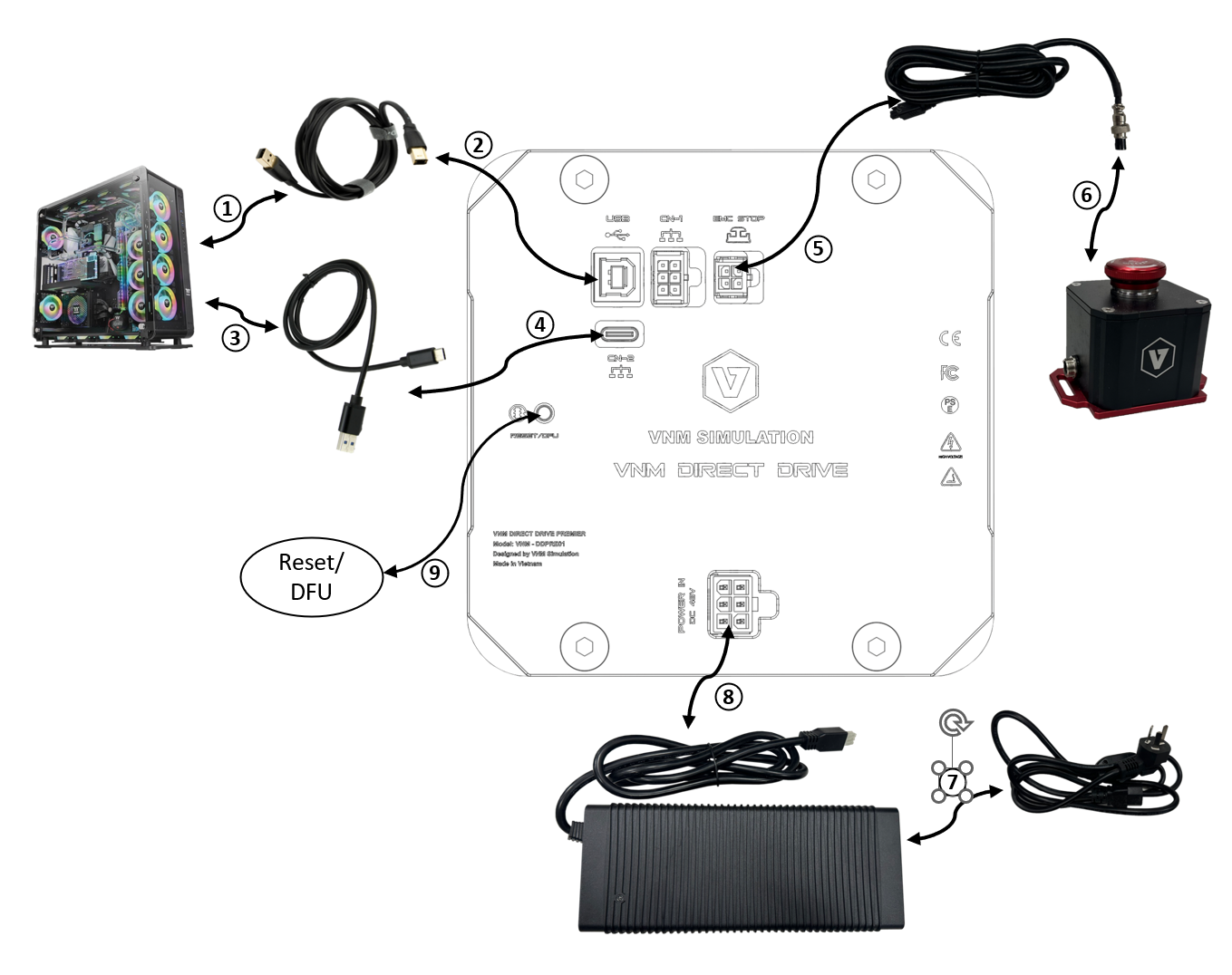
Figure 13. Connection ports of VNM Wheelbase Supreme
Wheelbase Premier, Lite uses a normal EMC Stop Button, and lower power adapters which has different appearance and the connection are same with the wheelbase Supreme.
CN-4 is used for future use.
Disclaimer:
Please note that the appearance of VNM wheelbases may vary from the illustrations in this User Manual and from the product images on the VNM Simulation website (https://vnmsimulation.com)
4. Product safety warnings and instructions
4.1. Intended Use and User Responsibility
-
The Wheelbase Supreme and Xtreme are designed for professional use only. Any other usage is at the user’s own risk.
-
These wheelbases are intended for use by adults who are in good physical and mental health.
4.2. Torque and Control
-
The wheelbases can generate high torque up to 32Nm.
-
Do not set the torque level higher than what can be safely managed with one hand.
-
If the torque becomes uncontrollable, release the steering wheel and press the EMC stop button.
4.3. Damage and Contact
-
If the wheelbase shows any signs of damage, discontinue use immediately and contact the seller or VNM Simulation.
4.4. Indoor Use and Environmental Conditions
-
These wheelbases are intended for indoor use only.
-
Avoid exposing the wheelbases to heat sources or direct sunlight.
-
Do not place the wheelbases in damp environments or in contact with water.
-
Recommended operating temperature: 10-35 degrees Celsius.
4.5. Power Supply and Connection
-
Unplug the power cord during thunderstorms or when the wheelbase will not be used for extended periods.
-
Always connect the DC side of the power supply to the wheelbase before connecting the AC side to the power outlet.
-
Only use the power supply and power cord provided with the wheelbase or obtained from an authorized reseller.
4.6. Device Handling and Safety
-
Do not open the casing of the wheelbase.
-
Handle the power supply with care to avoid damage.
-
The wheelbase contains magnets that may interfere with electronic devices. Keep such devices at least 20cm away.
4.7. Usage Recommendations
-
It is recommended to use the wheelbases for no more than 2 hours per day, with breaks after every hour. Excessive use of force feedback may be harmful to your health.
-
The surface temperature of the wheelbase can reach up to 70 degrees Celsius (158°F). Do not touch the wheelbase surface during operation or within 2 hours after use.
5. Safe Operation instruction
5.1. Read the User Manual
Carefully read the user manual before installing or operating the wheelbases.
5.2. Secure Installation
-
Securely mount the wheelbases on a rigid platform, such as a sim racing rig, using the specified mounting pattern in section 2.
-
Never operate the wheelbases without securing them to a rigid platform. Other types of fixings are not allowed.
-
Firmly install the EMC Stop button on the rigid platform in a position where it can be easily pressed.
5.3. Before Powering On
-
Download and open the VNM Config software from VNM Simulation to see operating status of the wheelbases.
-
Attach a steering wheel firmly using the VNM quick release set (not included with the wheelbase).
-
Ensure that children under 15 years old are kept away from the wheelbases.
-
Keep all loose objects, such as hair, clothing, and cables, away from the wheelbases.
-
Use a USB type B to type A cable to connect the wheelbases to the computer.
-
Connect the DC side of the power supply to the wheelbase.
5.4. Power On
-
Only plug the power supply into a 110-240 V AC outlet with protective earth after completing all the above steps.
-
Test the function of the EMC stop before each usage session.
5.5. Safety Precautions
-
Do not touch the freely rotating steering wheel directly or indirectly.
-
Always use the EMC stop button to stop and prevent motion.
-
Children under 15 years old are not allowed to use the Premier or Elite wheelbase in high torque mode, and any mode of the Supreme and Xtreme wheelbase.
-
After each use, press the EMC stop button or unplug the power supply.
-
Always press the EMC stop button before removing or attaching a steering wheel to the wheelbases.
-
Always use the EMC stop button to stop and prevent motion.
-
Children under 15 years old are not allowed to use the Premier or Elite wheelbase in high torque mode, and any mode of the Supreme and Xtreme wheelbase.
-
After each use, press the EMC stop button.
-
Always press the EMC stop button before removing or attaching a steering wheel to the wheelbases.
-
Do not release the EMC button unless the VNM Quick release handle is closed and the VNM Quick release is secure.
-
Inform other users of the safe usage of the wheelbases before use.